
Sequence Models & Recurrent Neural Networks (RNNs)
In this tutorial we will discuss about the sequence models & recurrent neural networks (RNNs). Sequence models take sequences of data as input and output/predict, for example, what word/letter that comes next in the sequence. Sequence of data could be anything from a stream of text, time-series data, video stream data etc. In the case of IMDB dataset, the entire movie review was transformed to form a single large vector and process it in one go into the network, this is known as feedforward networks. But this is not the way always the biological system work. For example, if we read a book, we process the information in a different way. May be one word at a time (if it is a child) or two/three words at a time (if it is an adult) while keeping the previous word/words in the memory to reconstruct the meaning of the sentence. The RNNs use the same idea in a simplified version. The RNN has an internal loop as shown in the figure.
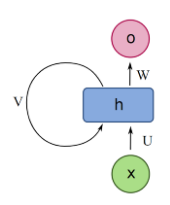
Here;
X: The input. It can be a word in a sentence or some other type of sequential data.
O: The output. For instance, what the network thinks the next word on a sentence should be given the previous words.
h: The main block of the RNN. It contains the weights and the activation functions of the network.
V: Represents the communication from one time-step to the other.
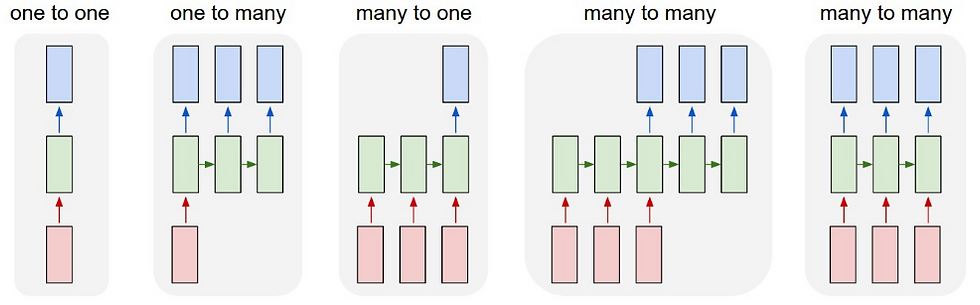
Some more example for sequence models are (ref 3);
Speech recognition (sequence to sequence):
X: wave sequence
Y: text sequence
Machine translation (sequence to sequence):
X: text sequence (in one language)
Y: text sequence (in other language)
Sentiment classification (sequence to one):
X: text sequence
Y: integer rating from one to five
Why not to use the standard neural networks?
1. Inputs, outputs can be different in lengths, not always will have a fixed length size.
2. Doesn't share features learned across different positions of text/sequence.
By using RNN we can overcome both of these issues. Elman (ref 4) considered the RNNs as a MLP with one unit layer looped back to itself. If we assume, x(t) is the input vector at time t, y'(t) is the output vector at time t and the z'(t) is the hidden layer at time t. The kth component of the output can be written as;

Here σ is an activation function. The context units are the neurons that are looped to themselves. However, Jordan (ref 4) introduces a method in which z'_l(t−1) is replaced in the last equation by y'_l(t−1).
There are different types RNN architectures. Few concrete examples are;
Long Short Term Memory:
Short-term memory is an issue in the RNN. If the sequence of data is very large, the model will have difficulties to carry the information from one time step to the other. For example, if we try to predict the content of the paragraph, the RNN might miss some important contents in the paragraph. Hence, it was realized to introduce a long short term memory (LSTM). The idea behind the implementation of the LSTM is to have a memory which is enough to last longer period of time. The LSTM architecture is represented in the diagram below. It has three gates known as forget gate, input gate and the output gate.

The LSTM's memory cell can maintains its state vector over a period of time and also it has a gating unit which is used to control the information flow to the memory.
How to use RNN for image captioning?
The below figure shows how to use the RNN for image captioning. The image is fed into the CNN architecture and the RNN is used to generate the text out of the image.

At first when we train the model, we have to make sure the text data are converted into word embeddings. That mean we convert the word into tokens, then we apply vector encoding of the tokens. For example,
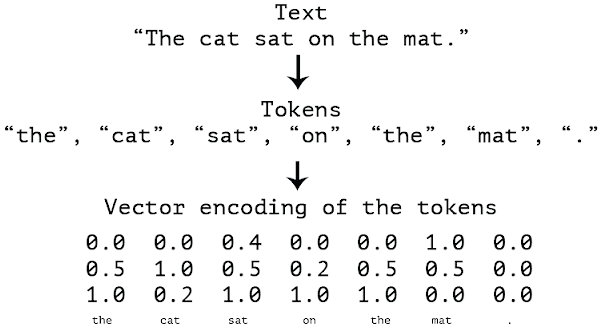
The process of converting the image into the word has the following steps (ref 6);
Take an image as an input and embed it
Condition the RNN on that embedding
Predict the next token given a START input token
Use the predicted token as an input at the next time step
Iterate until you predict an END token
Encoder
The encoder is any type of CNN architecture, for example, Inception V3, DenseNet121 etc. This is used to classify the images.
Decoder
The decoder is using the RNN and the LSTM to generate the captions. The figure below shows the complete architecture (Ref 8).

We will explain how each of these layer works when we implement the captioning.
Now let's discuss about the Image Captioning Problem. As mentioned above the image captioning is about for a given input image, what is the "description of the image". For example, see the image and the corresponding captioning next to it.
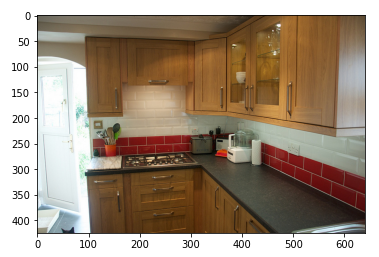
- A kitchen with brown cabinets, tile backsplash, and grey counters.
- A kitchen contains black countertops, brown cabinets, and a red and white tile blacksplash.
- A clean, organized, kitchen cabinet and countertop area.
- A kitchen has red bricks lining the counter.
- A kitch3en with wood cabinets and granite counter tops.
Let's use the dataset of Common Object in COntext (COCO) to develop the image captioning techniques (2014 dataset). In this exercise, we will use a small subset of the whole dataset. Training subset of 10K images, validation subset of 2K images and test subset of 2K images.The dataset is organized as follow;
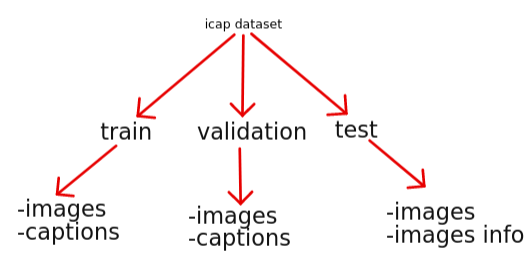
The folder 'encoded features' contains train_encoded_images.pkl, validation_encoded_images.pkl and test_encoded_images.pkl.
Let us use Colab to implement the lab. At first let us create a path to images and the corresponding caption dictionary linked to it.

Set the path to train, validation and the test dataset.
The function below takes two arguments. The imageID and the subset. Those are in the format of --- > COCO_{subset}2014_00.....{image_id}.jpg. This function return the image path and the caption path to that image. For each image there are 5 captions.


These two functions can be used to get the image name and to display the image.
We can retrieve the image path and corresponding image. The following is a display for the imageID of 25 in the subset of 'train'.
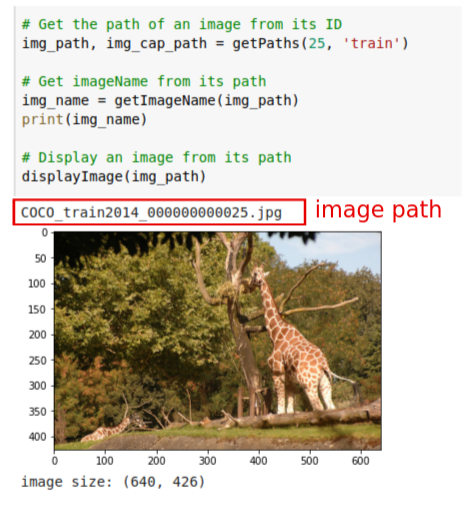
Now let us create a dictionary in Python in which the key is the image path and value is the captions.
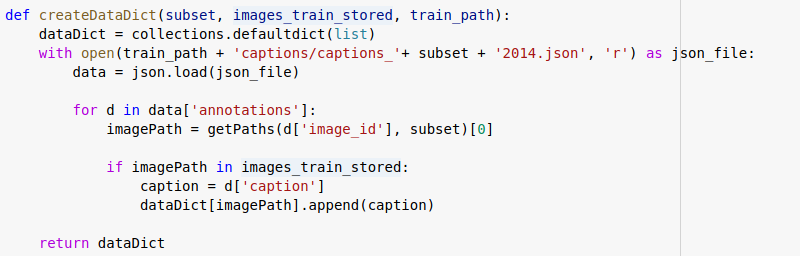
Now lets create list of path for images. And use the function createDataDict to generate the dictionary of keys and values pair. Similarly do the same creation for the validation data.

Display an image and the corresponding captions for that image like below;

Now lets do a Caption pre-processing. This is an important step in the Natural Language Processing task.

This function is used to create a list of captions from the dictionary.
The function below is used to clean the text data. We remove all the following symbols and replaces with the space. Moreover, we remove a single character and multiple spaces if any in the sentences.
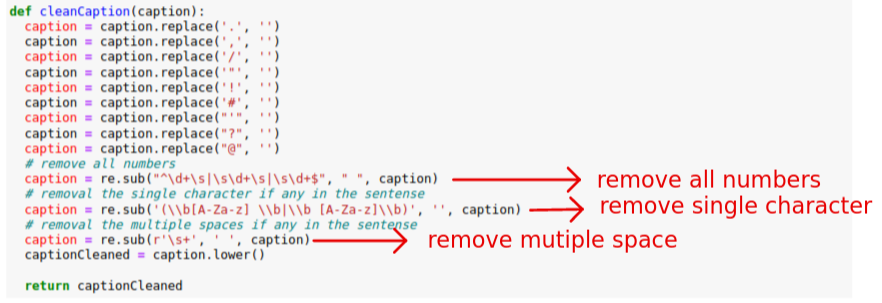
Also each sentence is encapsulated between <Start> & <end> string to distinguish from the next sentence.

Then lets do the caption pre-processing using the following function. Also check the few captions from the preprocessing.
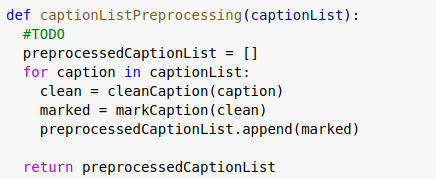
captionList = getCaptionList(images_captions_train) captionList[0:5] gives the following results;

preprocessedCaptionList = captionListPreprocessing(captionList)
preprocessedCaptionList[0:5]

Now lets compute the list of vocabularies from the caption list.

If we execute the snippet, we got the number of words: 539842 number of unique words: 9908
wordsList[0:2] (is the output of the getWordsListFromCaptionList(preprocessedCaptionList)) is as follow;
[['<start>', 'the', 'vanity', 'contains', 'two', 'sinks', 'with', 'towel', 'for', 'each', '<stop>'], ['<start>', 'clean', 'restroom', 'with', 'towels', 'and', 'washcloths', 'laid', 'out', '<stop>']]
Now lets turn the words into word vectors. The idea is that we try to represent each word by a number. So that it can be represented in a high dimensional vector space.
The following is the word embedding for some random words. Meaning the word 'amount' is represented by the number '261'.

The following function is used to create a list of words into a list of word vectors.
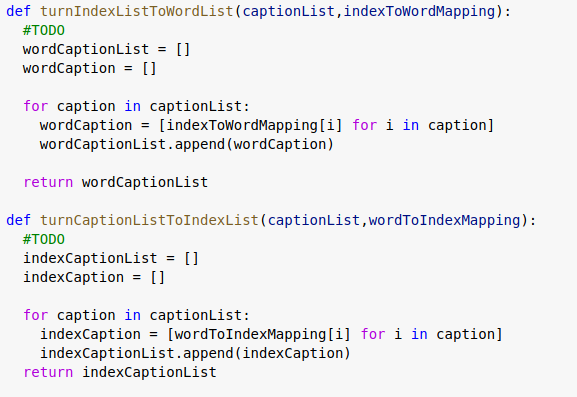
For example if we test to a small dataset, in our case '<start>' is 43, '<stop>' is 44 etc.

Lets recompute the captions from the word vectors. As we can see it returns the recomputed captions.
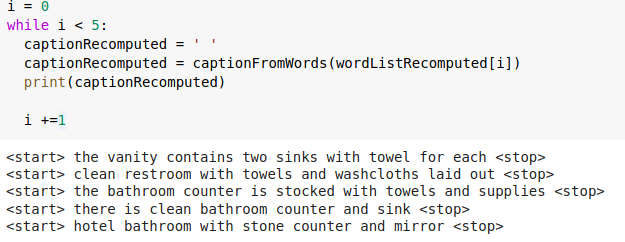
We have calculated the maximum length of the caption. I code snippet is as follow and we can see that we have obtained a length of 45.
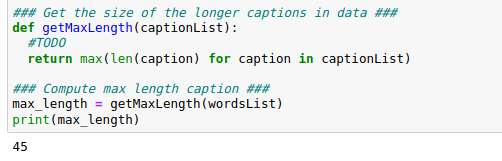
Image pre-processing is an important step to improve the performance of the network. In this step we resize all the images to (299, 299) and normalize it (image /=255).
Encoder: pre-trained CNN:
Clear the session if any in the tensorflow using tf.keras.backend.clear_session()
Lets create an inceptionV3 model architecture and use the weights as 'imagenet' and the top layer is 'True'.
inception = tf.keras.applications.InceptionV3(include_top=True, weights= 'imagenet') We will define the transfer_layer from 'avg_pool' and encoder as follow;
transfer_layer = inception.get_layer('avg_pool') encorder = tf.keras.Model(inception.input, transfer_layer.output)
The complete code snippet is as follow. You can see that the input shape of the tensor must be (None, 299,299, 3) and the output is (None, 2048). Here None means; we can pass as many as images as possible (which is not pre-defined). Also remember the images are 3 channels.

The following figure shows the pre-processed and the without it;

Let us encode all the images. If we encode one image for example, COCO_train2014_000000041796.jpg, we will get list of numbers as follow;
[0.8357095 0.11887199 0.62176037 ... 1.2768232 0.17466222 0.9203253 ]These are the feature values!! Now let us encode all the images in the dataset.

The result must be stored in a pickle file so that we can retrieve whenever we want. The following way is good to store the results;

We can load the pickle files as follow;

Now we will define the architecture. In our case we will use LSTM as the decoder. In our case maximum vocabulary size is 9908 and the maximum caption length is 45. Maximum length of caption is necessary to keep all the partial caption to the same length.

model.compile(loss='categorical_crossentropy', optimizer = 'adam', metrics=['accuracy']). If we want to get the accuracy, we must define the metrics=['accuracy'].
The following function helps to get the necessary data to fit the model. Also this function helps to add the zero padding.
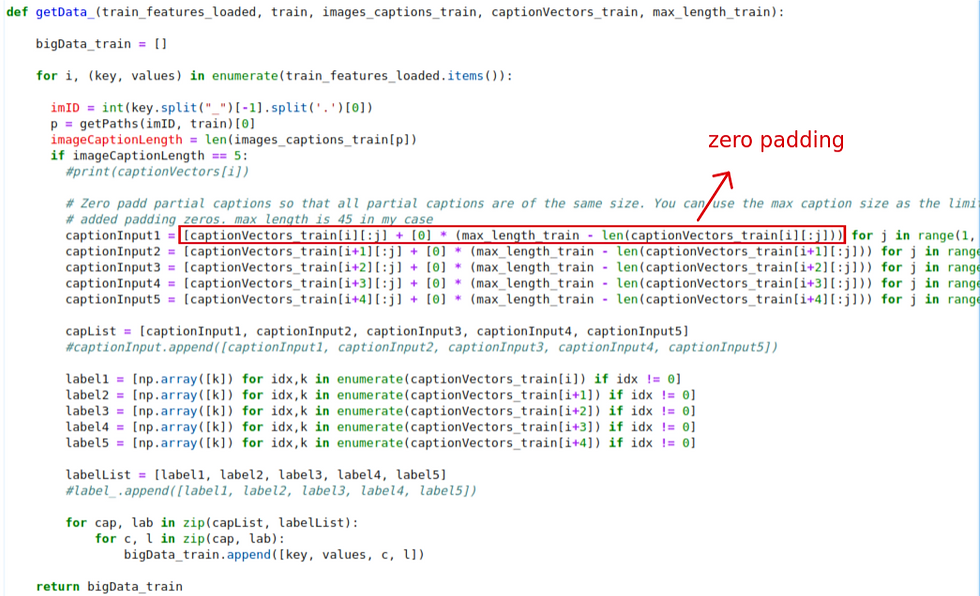
The return bigData_train can be used to visualize this in the pandas dataframe

Following is the pandas dataframe visualization for df_train. Similarly we can also visualize the df_validation. This is the format we need to fit the model.
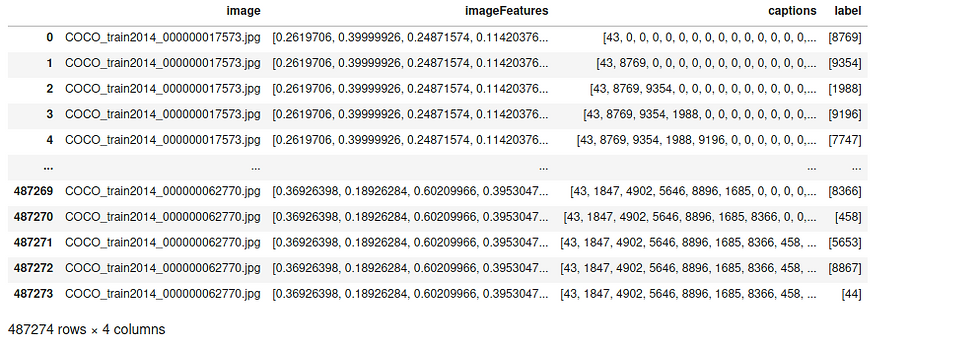
Next convert the panda dataframe to numpy array.

Reshape everything from 3D to 2D numpy array; similarly do the same for the validation data.

Now let us encode the labels (trainY_i & valY-i) like below. For example if we observe the shape of the data, we can see that it turns into (487274, 9908). This is a very important step. Otherwise we wont be able to fit.

Finally we can fit the model as follow;
history = model.fit([trainX_i_imageFeatures, trainX_i_captions], trainY_i, epochs=10, batch_size=32, validation_data= ([valX_i_imageFeatures, valX_i_captions], valY_i), verbose=1)
following is a screen-shot while training for few epochs;

There is a problem with the model. We can see that there is no change in the accuracy, however, loss is decreasing.
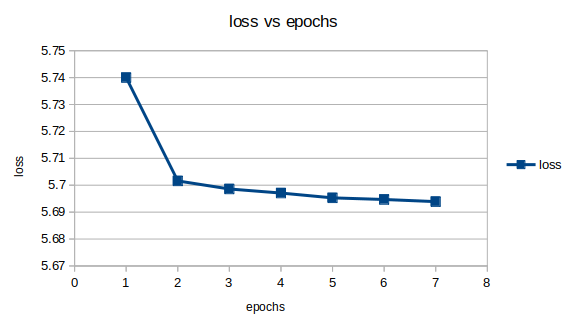
Now instead of adam optimizer, let us use Stochastic gradient descent, also known as SGD.
Set the learning parameter of 0.01. The following is the loss and the accuracy for each epochs.
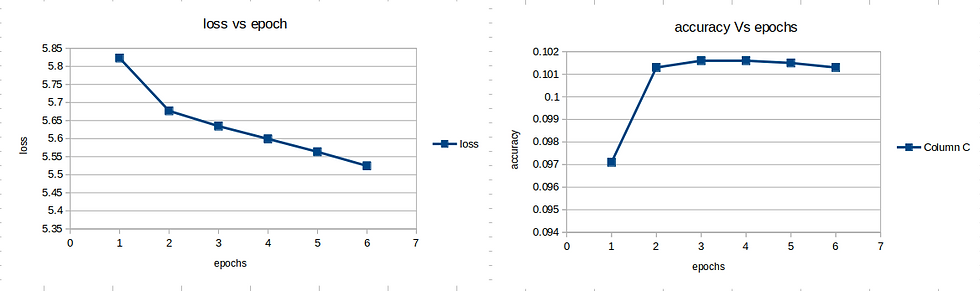
Let us set the learning parameter of 0.001 of SGD and see the performance;

So instead of inception, let us try out Resnet50;
resnet50 = tf.keras.applications.ResNet50(include_top=True, weights= 'imagenet')
In this case the input and the output must be as follow;
(None, 224, 224, 3)
(None, 2048)
But remember the image input shape is (224, 224, 3) in this case. The following is the loss and training accuracy.

Discussion:
Unfortunately, we don't see much improvement. One of the possible explanations is the dictionary that we have created at the beginning is very small. It contains very small number of words. Perhaps we can use things like GloVe: Global Vectors for Word Representation to improve the performance.
Moreover, we try to improve the text cleaning by removing unnecessary numbers, extra space, single character letters etc. The Jupyter Note book can be found here.
References:
Deep Learning with Python by Francois Chollet
https://medium.com/deeplearningbrasilia/deep-learning-recurrent-neural-networks-f9482a24d010
https://www.math.univ-toulouse.fr/~besse/Wikistat/pdf/st-m-hdstat-rnn-deep-learning.pdf
https://ahmetozlu93.medium.com/long-short-term-memory-lstm-networks-in-a-nutshell-363cd470ccac
https://freecontent.manning.com/wp-content/uploads/Chollet_DLfT_01.png
https://miro.medium.com/max/4744/1*ERwScS7k6IH3hZIJmGdHDg.png
https://data-flair.training/blogs/python-based-project-image-caption-generator-cnn/


Comments